A mail system whose core we wrote ourselves
Our own Mailezine engine and our own webmail: delivery, anti-spam, calendars, contacts, files and the admin console — with the data staying on your server.
The Mailezine engine
The core isn't assembled from other people's parts: SMTP, IMAP, POP3 and Sieve are implemented by us, protocol by protocol, in a single Go binary.
Single binary, zero IPC
Delivery, storage and filtering happen inside one process — no components talking over sockets. One container is the whole mail engine: a smaller deployment surface and a smaller failure surface.
Measured performance
Measured at a 10,000-user enterprise load: 4.4× receive throughput and roughly 1/25 the memory of a hand-assembled stack. The full methodology is published.
Pluggable storage
Metadata KV and body blobs are separately pluggable: start single-node on Pebble + local FS, scale out on TiDB + S3 — the same engine, an upgrade only swaps the storage backends.
Full-text search
An embedded index maintained on delivery, MIME-structured extraction of bodies and attachment text, optional Tika for PDF/Office. If the index is unavailable, search falls back to scanning — it never disappears.
Robust outbound
Delivery queue with exponential backoff and rate limits, SRS rewriting for forwarded mail, automatic RFC 3464 bounces on terminal failure, and SASL-authenticated smarthost relaying.
Transport security
STARTTLS plus implicit TLS (465/993/995) on all four protocols, MTA-STS and DANE for outbound links; Received chains and client fingerprint headers are stripped before sending.
Multi-instance HA (enterprise)
Lease-based active-passive engine: a standby takes over automatically when the primary fails. The control plane scales out too — stateless backend/frontend replicas join through the gateway, scheduled sends are atomically claimed (never duplicated), and background workers run on a lease-elected replica with 60 s failover.
Open-protocol compatibility
IMAP CONDSTORE/SORT/ACL extensions, mUTF-7 folder names, user+tag sub-addressing — standard clients connect with zero adaptation.
Webmail
Conversation view & folded quotes
Replies under one subject merge into a single conversation with its full timeline; quoted history in replies folds away until you expand it; a single message can be deleted on its own while the rest of the conversation stays (real screenshots below).
Composing
Rich text editor and reusable templates; mail merge personalizes each copy with {{name}} variables; scheduled send, send undo, burn-after-read, oversized attachments auto-turned into token links, and drafts that survive a crash.
Smart search
Type naturally: from:, to:, has:attachment, date ranges. Save frequent searches; filter unread, starred and attachment mail in one click.
Keyboard-first
/ to search, ⌘K for the command palette, ? for every shortcut; ten-thousand-message lists scroll smoothly.
More than an inbox
Personal calendar, contacts, cloud drive and a home dashboard are built into the webmail — recent files and upcoming events one screen away, no bolt-on services to hop between.
Privacy built in
PGP signing and encryption (S/MIME in the enterprise edition), two-factor auth, remote-image blocking against tracking pixels, a visual Sieve editor, and contacts grouped by sender.
Live arrival, snoozed for later
New mail arrives instantly over SSE / Web Push; snooze any message to later today, tomorrow or next week and it returns to the inbox when due.
AI assistant (enterprise)
Long-thread summaries, tone-matched draft replies, automatic inbox triage, semantic search. Models are configured centrally by the org admin — on-premises models supported, mail data never leaves the rack.
Offline capable
Installable PWA that works offline; light/dark themes, three list densities and accent colors, adjustable to personal habit.
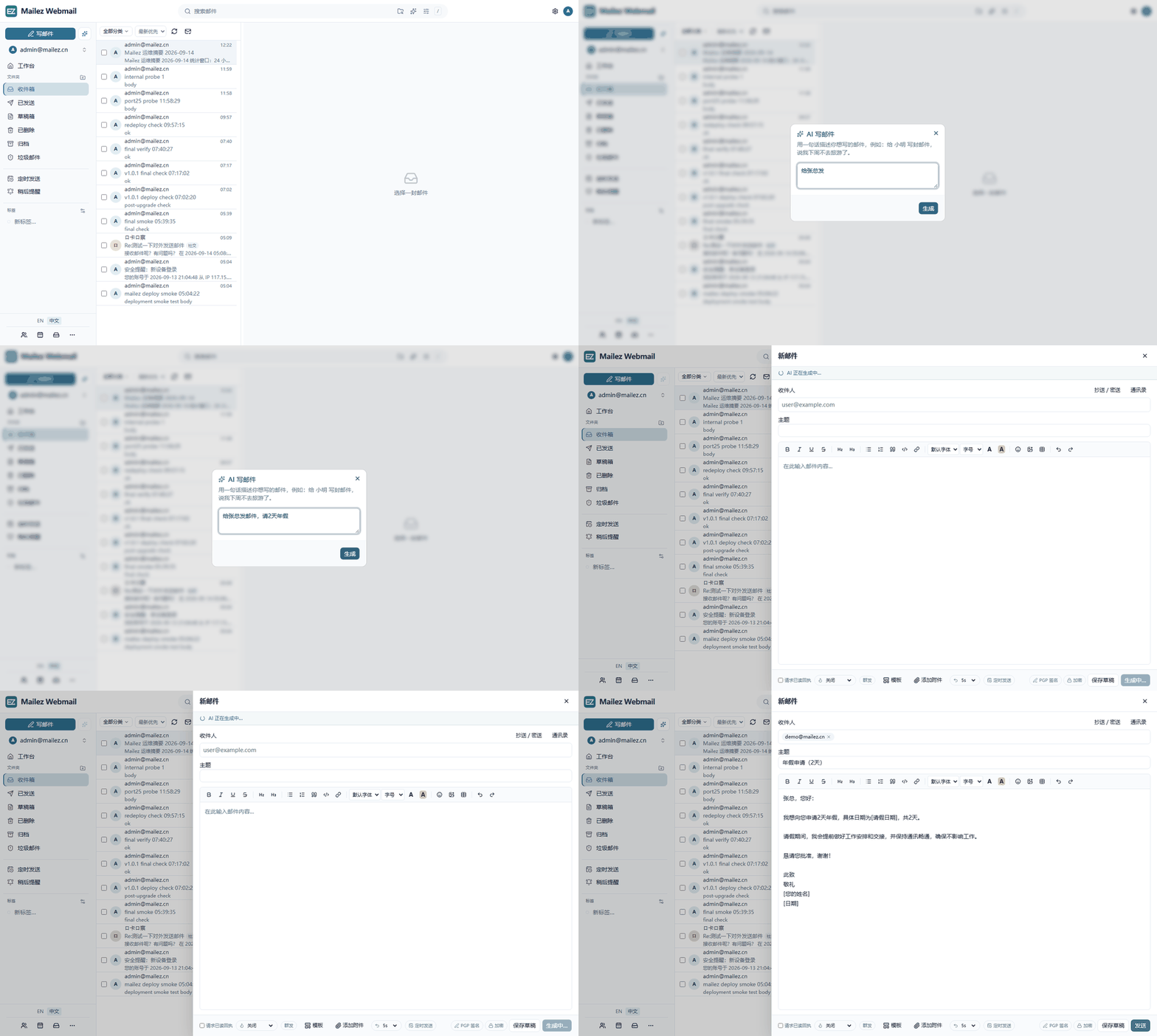
AI compose: one sentence, a finished email
Click ✨ in the composer and describe what you want (here: “email Mr. Zhang, two days of annual leave”). The model streams back the whole message — it resolves the recipient, drafts the subject and writes the body in a business tone, leaving placeholders for the details only you know. The org admin chooses the model; self-hosted endpoints keep mail data inside your network.
Conversation View & Quote Folding
Real product screenshots, straight from the Webmail defaults.
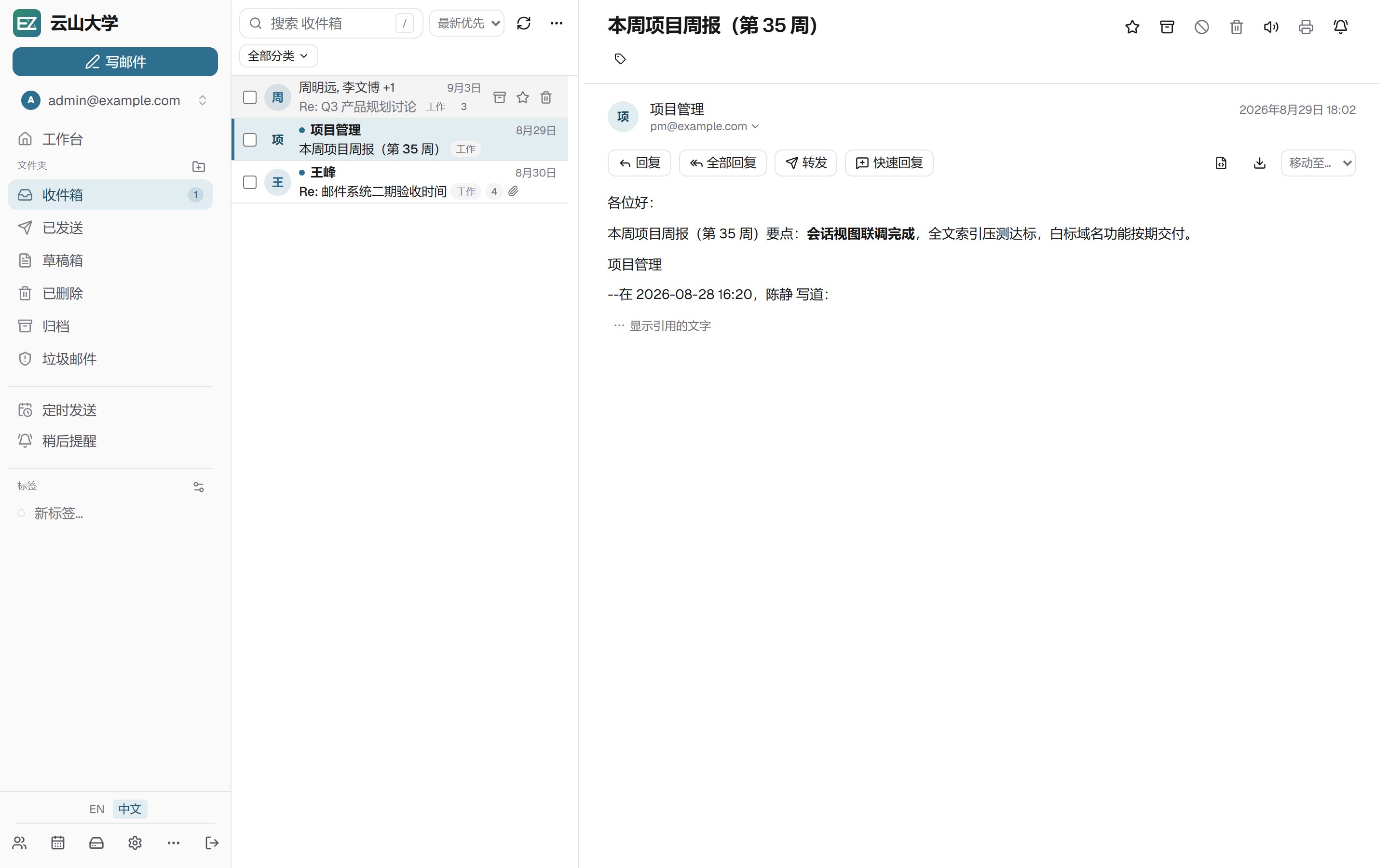
Conversation view
Replies under one subject merge into a single list row with a count badge. Open it to see the whole discussion in order — who said what, at a glance.
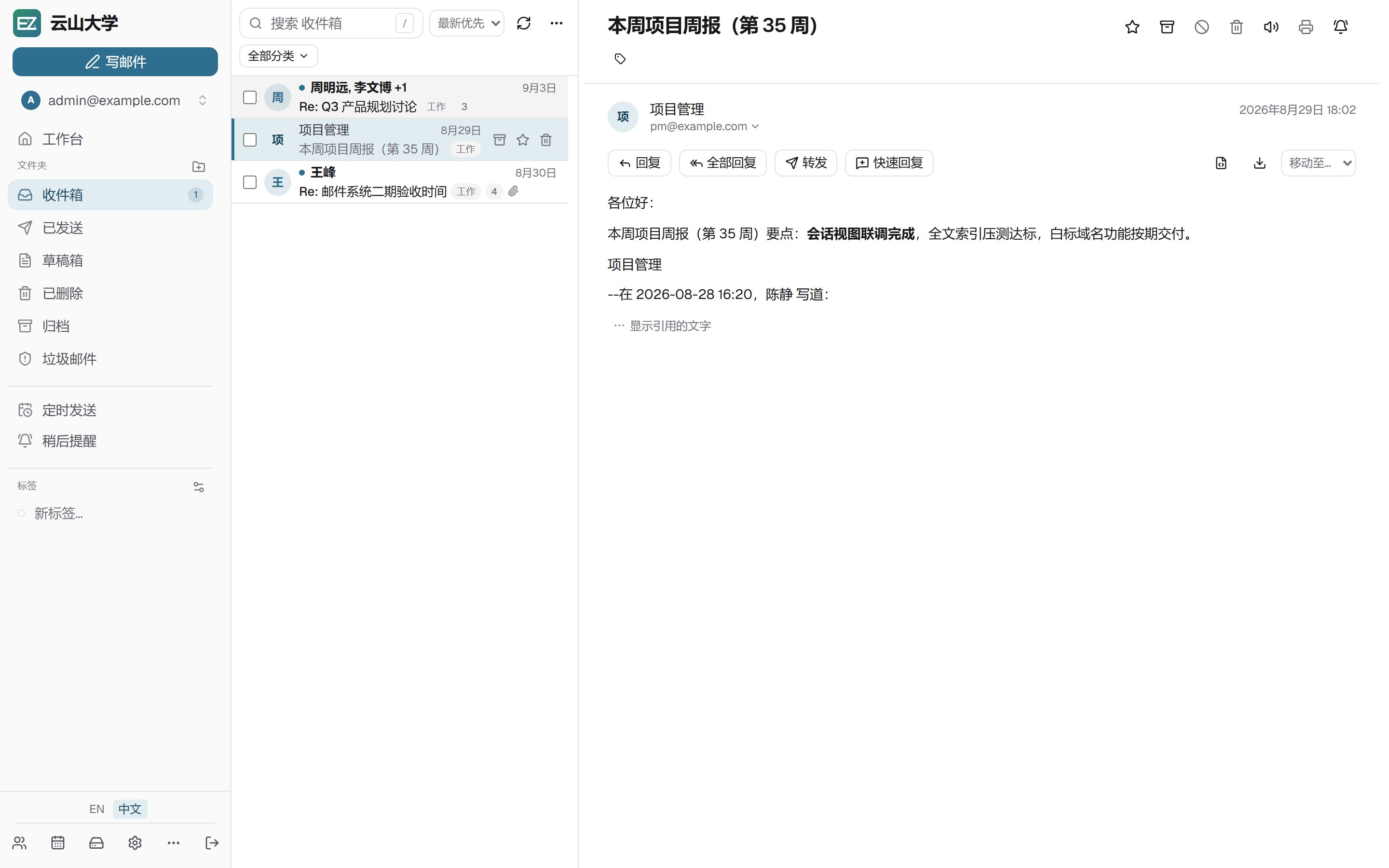
Fold quoted text in replies
Long quotes collapse into a compact fading block, so the reply reads at a glance. Expand the quote when you need the original — fold it back when you don't.
Mobile & Sync
ActiveSync (enterprise)
Native ActiveSync for iOS and mainstream mobile clients: FolderSync, incremental sync, long-connection Ping push and SmartReply, configured with the mailbox password or an app token.
CardDAV contacts
A built-in CardDAV server syncs contacts both ways with phones and desktop clients; vCard import/export with dedup and merge.
CalDAV calendar
A built-in CalDAV server syncs events and all-day entries both ways; month/week views, shared calendars, ICS subscriptions and export.
App tokens
Issue a separate token for every third-party client — the master password stays private. Revoke any token independently, on top of 2FA.
Delta Chat
Generate a login QR in settings and scan it with the Delta Chat app to turn the mailbox into an end-to-end-encrypted chat account; server setup travels in the scan, and admins can mint codes for any user.
Compliance & Directory (enterprise)
AD / LDAP integration
LDAP/AD authentication fallback, an org directory browsable as a department tree, LDAP groups expanded live into mailing lists, and account lifecycle sync.
Mail archiving
The engine captures every sent and received message; retention policies, metadata search, review notes, .eml download and mbox export.
Outbound DLP approvals
Keyword/regex rules match outbound mail; hits are blocked or routed to approval. The approval desk releases or rejects; expired requests auto-reject.
Mailing lists
One address delivered to many members (external ones included); internal-user search, nested groups and live LDAP group expansion.
Audit & announcements
A complete operational audit log, plus organization-wide announcement banners published in one click.
Webhooks
New-mail event callbacks to external systems with HMAC signature verification — ticketing, CRM and monitoring hooks.
Admin console
Health checks & DNS wizard
The Health page live-checks every domain — MX / SPF / DMARC / DKIM key comparison / Spamhaus blocklists / autoconfig / MTA-STS — each with a status and a fix hint; the DNS wizard lists every record you must publish with live verification, ready to copy.
One console
Domains, mailboxes, aliases, relays, external-account fetch and app tokens, all managed in one interface — no config files to dig through.
One-click DKIM
Signing keys generated with status hints and DNS records laid out for you — keep your mail out of the spam folder.
Audit log & RBAC
A full record of who did what and when; admin / manager / user roles keep authority clear.
Config import/export
Back up the whole configuration in one click and restore it on a new server — handy for batch delivery and versioning.
Archive & DLP (enterprise)
Global or per-domain archive policies and retention; DLP rule CRUD with the approval desk, keeping sensitive outbound content under control.
Announcements & anonymous aliases
Organization-wide announcements in one click; anonymous aliases protect real addresses for anonymized outbound scenarios.
Security & anti-spam
Layered anti-spam
The community edition ships a baseline engine — sender reputation scoring, DNS blocklists and allow/block lists, enabled by default. The enterprise edition upgrades to self-learning Rspamd with Bayesian and fuzzy rules.
Spam learns from you
Moving mail into or out of the Junk folder trains the filter automatically — flag one spam and the next one like it never reaches the inbox.
Malware scanning
Attachments are scanned for macros and known threats before delivery; mailbox quotas and sending rate limits keep the system healthy.
Encryption & signing
PGP key management with OpenPGP sign/encrypt/verify (plus S/MIME certificate signing and encryption in the enterprise edition), one click away while composing; DKIM signing and DMARC configured automatically.
Account protection
TOTP two-factor auth, login rate limiting and brute-force protection, new-device alerts; every app token managed independently.
Burn after read
Bodies can be set to self-destruct after reading (the $BurnRead keyword) — sensitive conversations leave no trace.
Protocols & client compatibility
Everything speaks open standard protocols — no client lock-in. Mainstream desktop and mobile mail apps connect directly.
SMTP
25 / 587Receiving and authenticated submission; outbound queue + rate limits
IMAP
143 / 993Sync, folders, conversations and full-text search
POP3
110 / 995Download-and-manage-locally for classic clients
ManageSieve
4190Server-side filters with a visual webmail editor
Deployment & migration
Community · one command
Docker Compose brings up the single-node stack — SQLite control plane + the Mailezine engine, zero external database (MySQL/PostgreSQL a config flip away) — on any Linux server or existing Docker environment.
Enterprise · distributed
The same Mailezine engine switches to TiDB + S3 storage to scale horizontally; lease-based engine HA plus stateless control-plane replicas (backend and frontends) that scale out on demand — same UI and habits.
Migrate in place
Existing traditional (Maildir) deployments import in one pass with the built-in mailezine migrate — order, flags, keywords and internal dates preserved.
Cross-platform native
Linux / macOS / Windows behave identically; dev and production share the same build, no platform lock-in.
# Configure the environment
cd deploy
cp mailez.env.example mailez.env

# Start (community profile)
./deploy/mailezctl.sh up ce

# Create the admin account
docker compose --env-file mailez.env -f docker-compose.ce.yml exec backend mailez-seed